Our game · Coming soon to iPhone
Swing the phone. Golf anywhere.
Hold your iPhone like a golf grip, make a small, smooth swing and lift your thumb as the club comes to the ball. Your cut-out golfer, with your own face on a bobble head, swings your swing in the replay. Three courses and 27 holes, one of them inside a giant’s house. Hole 1 is free, then £4.99 once. No ads.
- 27
- holes on three courses, one of them inside a giant’s house
- 4
- golfers on one phone, passing it round
- £4.99
- once, after a free first hole. No ads
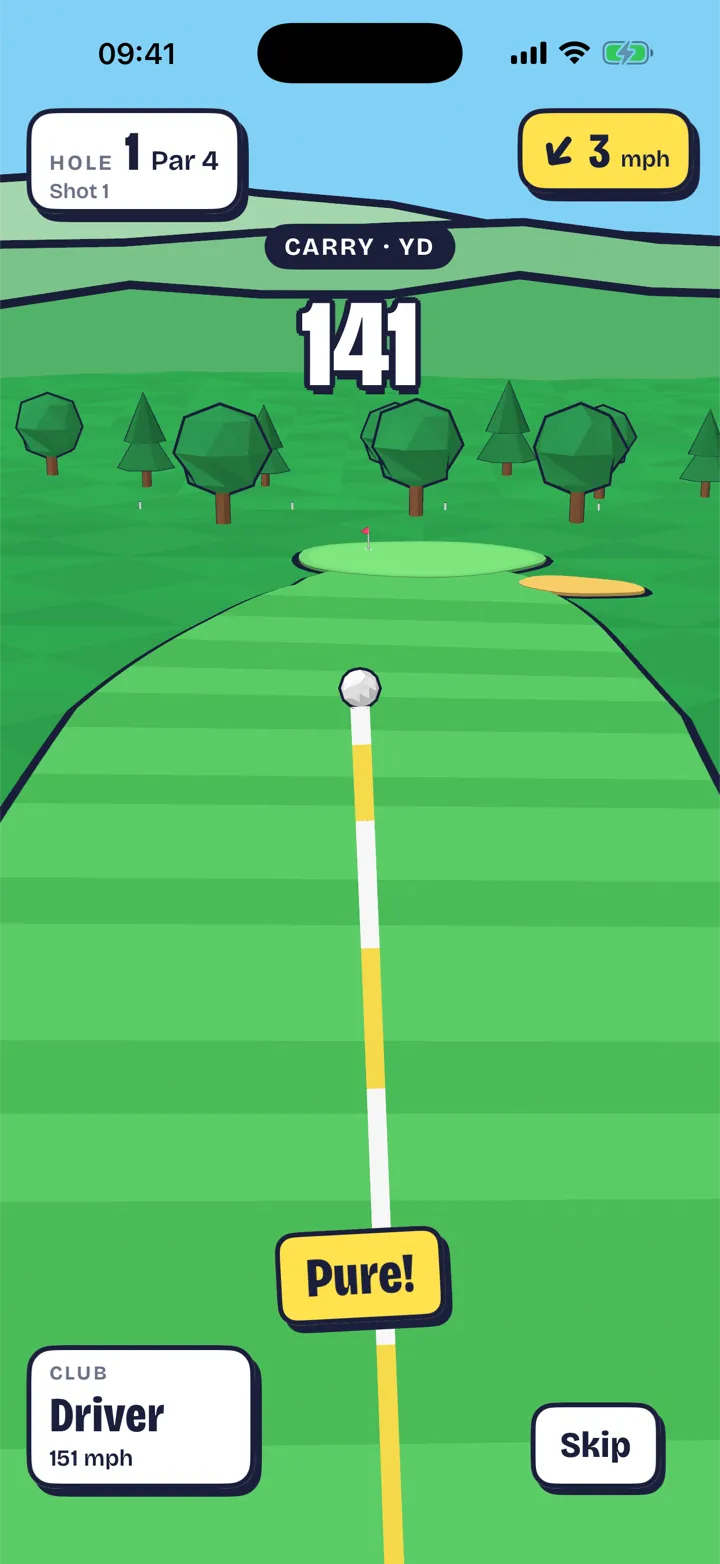
The strike is your thumb. Both hands stay on the phone.
Phonewood turns an iPhone into a golf club. You hold it like a grip, make a small, smooth swing and lift your thumb as the club comes to the ball. Timing, not power: your own comfortable swing is full distance, and a harder one only sends the ball off line.
Your phone is the club
Two hands round the bottom of the phone, a thumb on the big grip pad, and a small, smooth swing. Lift your thumb as the club comes to the ball: that’s the strike. Three practice swings set your own swing as full power, so swinging harder never adds distance.
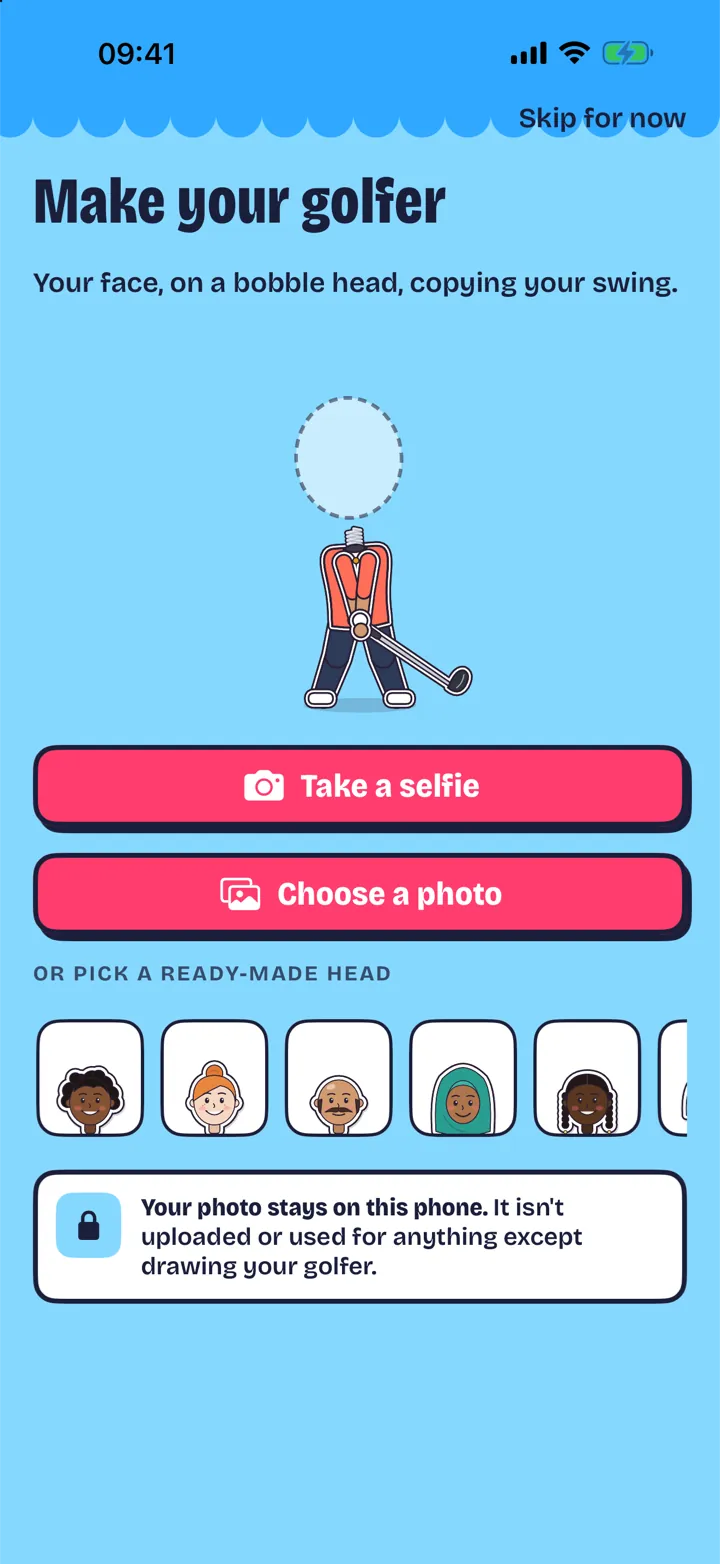
Your face on a bobble head
Take a selfie and the phone turns it into a cartoon bobble head on a paper cut-out golfer, or pick one of eight ready-made heads. After each shot the replay plays back the swing you made, on your golfer. The photo never leaves the phone.
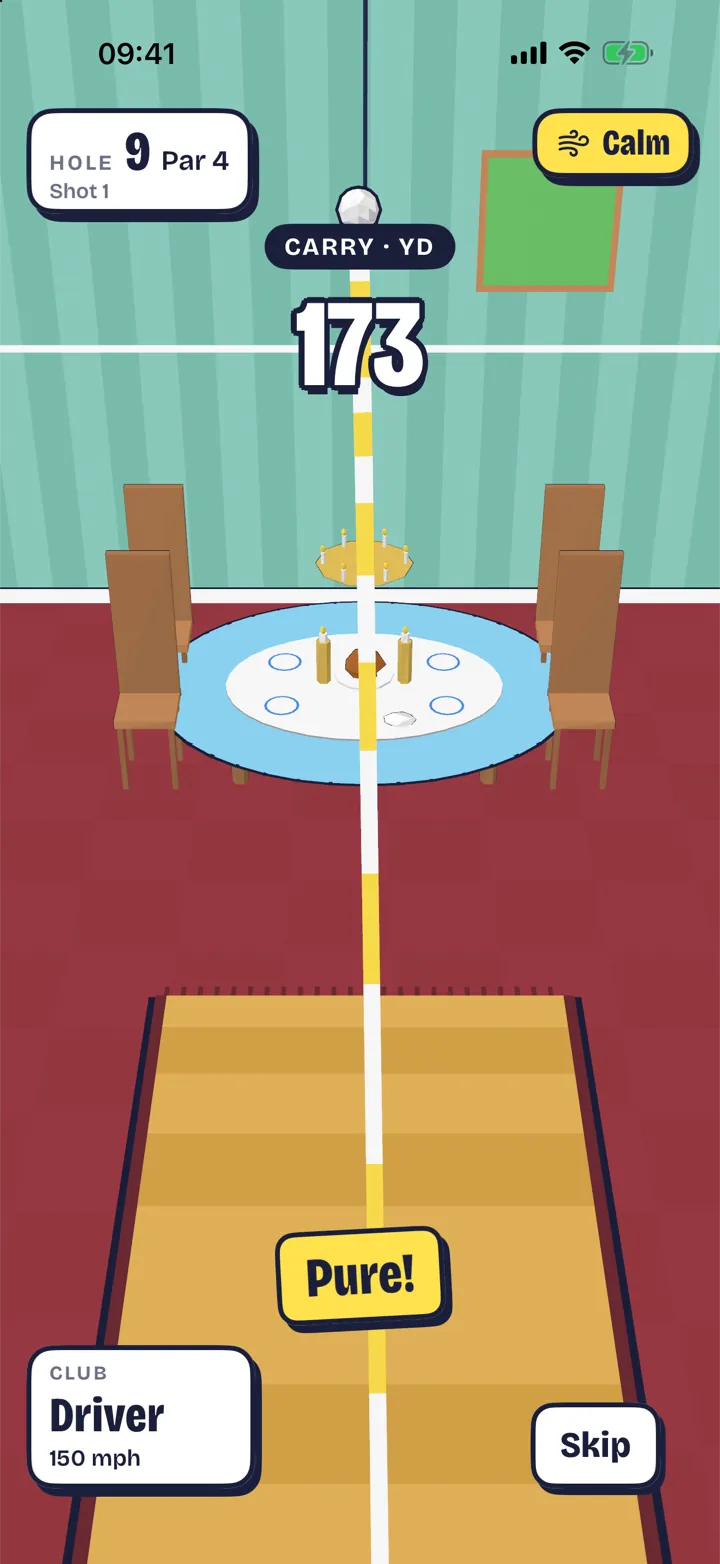
Golf through a giant’s house
Three courses, 27 holes: Meadowbank, a sunny parkland to learn on; the Giant’s House, where the fairway is a rug, the bunker is a sugar bowl and you putt across the dinner table; and Blowhole Bay, clifftop links in real wind.
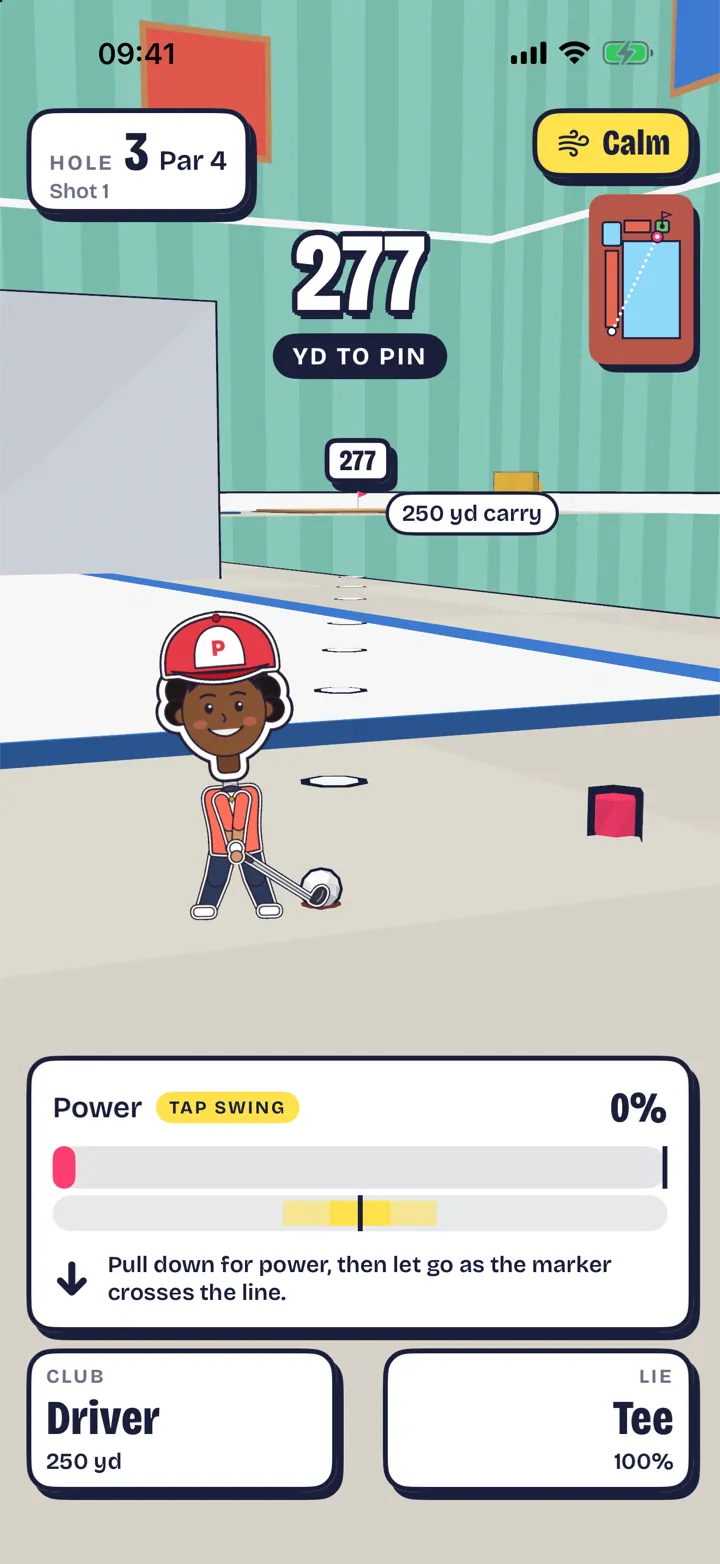
Or don’t swing at all
Tap Swing plays every hole without moving the phone: pull back on the screen and let go as the marker crosses the line. It’s the same strike timing, for sitting down, small rooms, or anyone who’d rather not swing.
How it is built
It began as a swing lab, before there was a course: an app that read real swings from the phone’s motion sensors, so the swing reader, the shot model and the ball flight were built and tested on their own. That is where the rule came from: the strike is the thumb lifting, and both hands stay round the phone.
Back to all work- Native Swift: SwiftUI for the screens, RealityKit for the courses and CoreMotion for the swing
- A swing reader, shot model and ball flight of its own, built and tested against swings recorded on real iPhones before any art was drawn
- The strike is the thumb lifting off the grip pad, timed against the swing. Lifting it on the way back cancels the shot
- Full power is your own comfortable swing, set by three practice swings: a harder swing adds spin and sends the ball off line, never further
- The selfie is cut out and made into a cartoon bobble head on the phone, with Apple’s Vision framework, and never uploaded
- Pass-and-play for up to four, and Game Center rounds where a friend plays the same nine against your ghost ball
- Laid out for every iPhone from the 12 mini to the Pro Max, left- or right-handed, with VoiceOver, Dynamic Type and Reduce Motion
- Scores and settings sync through iCloud. No account and no ads
- StoreKit 2 for the full game and Moon Links, both with Family Sharing. No coins, no subscription and nothing random for money
- Designed and made by Hoome.
Questions people ask
- What kind of game is Phonewood?
- A golf game for iPhone where the phone is the club. You hold it in both hands like a grip, make a small, smooth swing and lift your thumb as the club comes to the ball: the timing of that thumb is the strike. The ball flies down a bright toy course, and your paper cut-out golfer, with your own face on a bobble head made from a selfie, swings your swing in the replay. Three courses, 27 holes, and up to four players on one phone.
- What’s free, and what does it cost?
- Hole 1 of Meadowbank is free as often as you like, on your own or in pass-and-play, and so is making your golfer. The Full Game is a one-off £4.99 for every hole of the three courses, every club, the Range, Closest to the Pin, pass-and-play and friends’ rounds. Moon Links is an optional £1.99 extra course for full-game owners. There are no ads and no subscription. Prices are the UK App Store’s and may differ where you are.
- How do I hold the phone?
- Like a golf grip: both hands wrapped round the bottom of the phone, the top pointing at the floor, and a thumb on the big grip pad. Use a wrist strap or a case with a lanyard if you have one. Make a small, smooth swing and lift your thumb off the screen as the club comes to the ball. That’s the strike. Only the thumb moves; both hands stay round the phone. Lift your thumb, keep your grip. The safety card is always in Settings › How to hold it · safety.
- Can I play without swinging the phone?
- Yes: Tap Swing. Pull back on the lower part of the screen for power and let go as the moving marker crosses the centre line. It’s the same strike timing as a motion swing. Choose “Play without swinging (Tap Swing)” on the safety card the first time, or switch any time in Settings › Swing with. Every hole, course and mode works with it, and VoiceOver users can pick a full, three-quarter, half or quarter swing from the Actions rotor.
- How much room do I need?
- Room all round you, with nobody nearby and nothing breakable in reach: no lamps, screens or windows. The swing is small, and three practice swings set your own comfortable swing as full power, so swinging harder never sends the ball further. If there isn’t room, use Tap Swing.
- I changed my mind mid-swing. What happens?
- Lift your thumb on the way back, at the top or early in the downswing, and the shot is cancelled with no penalty. With no thumb on the pad, the game doesn’t read a swing at all.
- Can I play left-handed?
- Yes. The first launch asks which way you swing; change it any time in Settings › I swing. Your golfer stands on the other side of the ball and the swing is mirrored, while your face stays the right way round. In pass-and-play every golfer has their own hand.
- Which iPhones does it run on?
- Any iPhone on iOS 18 or later. Phonewood is made for iPhone 12 and newer, and its screens are laid out for every size from the iPhone 12 mini and 13 mini up to the Pro Max. It’s for iPhone only. Game Center challenges and activities need iOS 26; everything else works on iOS 18.
- My shots go too short, or too far.
- Redo your practice swings in Settings › Redo practice swings, with the same comfortable swing you’ll play with. Full power is measured against those three swings. You can also change the assist (Easy, Normal or Pro) in Settings.
- I can’t hear the swing.
- With the silent switch on, the haptics carry the swing. Turn on Settings › Swing sounds on silent to hear the ticks, the whoosh and the thock anyway. Sound effects and haptics can each be switched off in Settings too.
- How do I make my golfer?
- Clubhouse › Locker, then Take a selfie, Choose a photo, or pick one of the ready-made cartoon heads. The game offers it after your first replay too. Outfits, caps, glasses and celebrations are free or earned by playing; nothing is for sale.
- How do I restore my purchases?
- Sign in with the Apple Account you bought with, then Settings › Purchases › Restore purchases. The unlock screen has a Restore purchase button too. Both purchases are shared with your family group through Family Sharing.
- I asked a grown-up to approve a purchase.
- With Ask to Buy, the unlock says “Waiting for a grown-up to approve” and you can keep playing hole 1. Once it’s approved on their device, the game unlocks by itself, even while it’s open.
- Will my scores follow me to a new phone?
- Yes, if you’re signed in to iCloud on both. Scores, records, settings and the round in progress are kept in your own iCloud. Your selfie isn’t: it stays on the phone you made it on, so make it again on the new one.
- Do I need Game Center?
- Only for friends’ rounds, the leaderboards and achievements. Solo play, pass-and-play, the Range and Closest to the Pin all work without it. Game Center signs in quietly when the game starts; if you’d rather not, the game carries on without it.
- Is my selfie uploaded anywhere?
- No. It’s made into a cartoon head on the phone and stays there, excluded from backups. A friend’s round only carries a cartoon look, never a photo. Your face is only in a postcard or video if you share one yourself. Delete the photo any time in the Locker. Our privacy policy, at hoome.co.uk/privacy, has the detail.
- Where can I get it?
- Phonewood is coming soon to the App Store, for iPhone only. It will be free to download, with hole 1 free as often as you like.
- Something not right?
- Email [email protected] with your iPhone model, your iOS version and what happened. If it’s about a shot or a hole, the course and hole number help. We’re a small studio in the UK, and we’ll get back to you within a day or two.